macOS Editor's Pick Games

Dead Reset 1.0.5 fix

8 views
Dead Reset

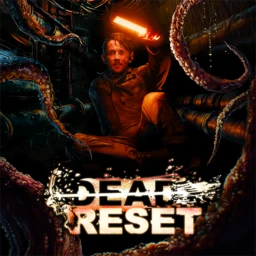
In order to perform surgery on a patient and remove a terrible parasitic monster, surgeon Cole Mason is abducted and transported to an undersea institution. In the gory interactive horror game Dead Reset, each death draws you nearer to the truth.

Death is unavoidable.

Discover the way to salvation by comprehending the cycle of death. Death is merely a new and frightening possibility, not the end.

Look with fear in your eyes.

With terrifying special effects and gameplay where every decision counts, immerse yourself in an interactive cinematic tale. Imagine yourself in the middle of a vicious science fiction horror movie.

Choice is important.

Lead Cole so that he can either escape or die. There are no simple answers. Your morals will be tested at every stage, and your actions will lead to four very different endings.

Stop the terror

Playing for viewers? Enable Streamer Mode, which eliminates time constraints on decisions, so your viewers can determine Cole’s fate and relive his awful deaths.

Who do you trust?

Gain or destroy trust. Every connection you form or destroy affects your route to survival. Use the in-game tracker to check your relationships with other characters if they’re still alive.

Important Features:

  • The Death-Loop Mechanic: You are brought back to the instant you wake up each time you fail or pass away. However, dying gives you important information that helps you make other decisions, enabling you to avoid scenes you’ve already seen and follow fresh storylines.
  • Massive Decision Tree: With hundreds of options to choose from, you can significantly impact character relationships and the plot’s course.
  • Multiple Endings: Depending on your decisions and morality, the eight chapters in the story have four different endings and a number of hidden events.
  • In-Game Tracker: You may see your connection status with other characters, keep track of statistics, choices, and deaths, and get mysterious clues thanks to a unique multi-screen system.

Frequently asked questions

How to install and activate?

Run the downloaded image and drag the application to the Applications folder shortcut.
Once copying is complete, the application can be launched via Launchpad.

Is the program corrupted? Is the file broken? Or is there other errors?

There are so many errors, we can't list them all here. Therefore, we've described all the solutions (with pictures) in the article: Errors when installing applications on a Mac

How do I update? Officially? What happens with activation?

Official updates may result in loss of activation unless otherwise stated in the installation instructions.
To update the software from this website, you must download the new version of the software from here (if available) and install it over the version currently installed on your computer. This will preserve your activation and settings for the software.

How do I download it? The link isn't working? What is .torrent?

To download large files, it is recommended to use any download manager, for example, FDM (Free Download Manager)
For downloading from a file sharing service like Filen.io, it's not recommended to use Safari. Use Google Chrome or the aforementioned FDM browser, for example.
To download files via torrent (.torrent file), you need a torrent client, such as Transmission or the aforementioned FDM.
Please remember that providers may block access to some websites (1fichier.com, etc.). To bypass these blocks, it is recommended to use a VPN.

An update has been released. When will you update the version?

The site administration doesn't hack anything. That's the job of release teams and some enthusiasts. They're the ones responsible for ensuring updates are available. But you can hack software yourself by learning reverse engineering.

Add... Where is the order desk?

Definitely not in the comments. The site administration doesn't hack anything, and there's no order desk. However, you can order the software you need (not for free) in a special thread on forum.ru-board.com.

How to change the language?

Open System Preferences -> General > Language & Region -> Applications – "+".
Select an app and language. This method works for most apps.
The language in Adobe products is usually selected during the installation of the product itself.
The language in games is usually changed in the game settings itself.
There are exceptions. Don't hesitate to search for information online.

How to delete?

There are many options. The easiest is to use specialised app removal tools, such as App Cleaner & Uninstaller.
To remove Adobe products, use the Creative Cloud Cleaner Tool.

Need help?

The site offers a paid service: remote assistance (via AnyDesk, Zoom, or Skype) with the installation of any applications (not just those from this site) on any Mac or PC.

specs.txt
version1.0.5 fix
developerDark Rift Horror, Wales Interactive
activationNot required
testedmacOS Tahoe , Mac mini 2024 M4
size14GB
architectureARM , x86 (64-bit)
languagesRussian , English , German , Spanish , Simplified Chinese , Polish , Portuguese , Turkish , French
voice_langsEnglish

Installation notes

Run the downloaded image and drag the application to the Applications folder shortcut.
Once copying is complete, the application can be launched via Launchpad.

Download — Download from Mail.ru

14GB · v1.0.5 fix

More mirrors (1)

Always scan downloaded files before opening them. This listing is provided for informational purposes; verify compatibility with your system before installing.

Leave a comment

Your email address will not be published. Required fields are marked *