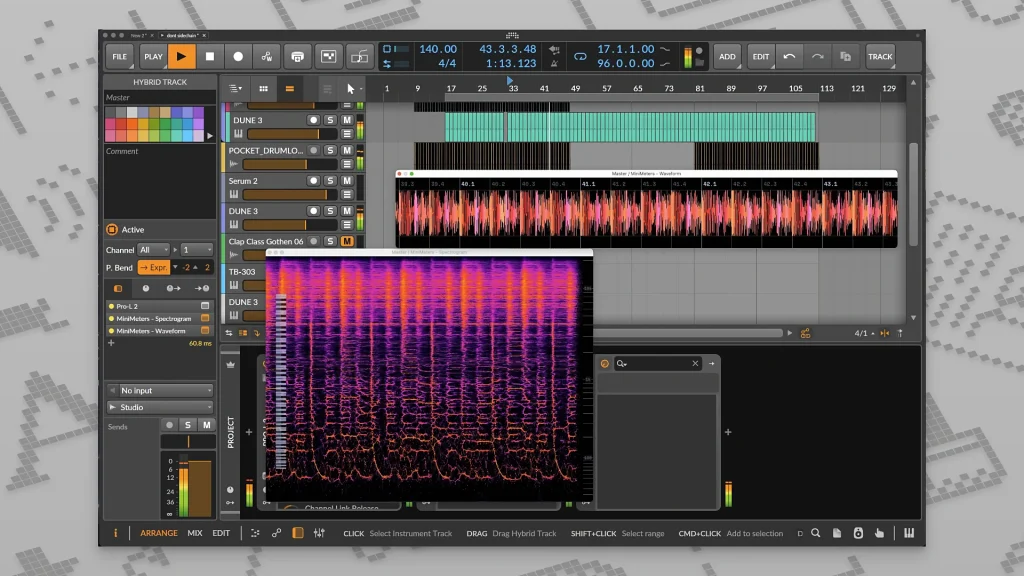
For music producers, sound designers, and audio engineers, MiniMeters is a well-liked, portable standalone audio metering program. It costs about $10 and provides real-time visual feedback of your computer’s audio, including waveforms, loudness meters, and spectrograms, to assist users in creating better mixes and identifying phase or EQ problems.
Who Uses It and Why
Because of its accessibility and cost, MiniMeters has gained a lot of popularity in the music production industry and is frequently featured on sites like Instagram and TikTok. It is used by producers to:
- To make sure that frequencies don’t collide, visualize the relationship between the kick drum and bass on the spectrogram.
- Using the multi-band stereo meter and mid-side modes, keep an eye on phasing problems and stereo width.
- When constructing mixes for DJ software (such as Pioneer CDJs/Rekordbox), it is very useful to see precisely how a track’s peaks are managed.
Core Features of MiniMeters
- Multiple Modules: Use several meters, such as the Spectrum Analyzer, Spectrogram, Oscilloscope, Loudness Meter (LUFS), and Stereometer, to personalize your workspace.
- MiniMetersServer: Use VST3, AU, or CLAP plugins to route audio straight into the program from your Digital Audio Workstation (DAW) master channel.
- Drag-and-Drop Recording: Record the final 10 to 60 seconds of your audio, then drag the exported file straight into your DAW timeline.
- “Stick Mode”: Attach a smooth, horizontal strip of modules to the top of your screen, which functions as an integrated supplementary display by dynamically shifting your DAW to fit perfectly underneath.
- Custom Layouts: To see just what you need at any given time, pop out individual modules or use layouts like the “Quad” view.