macOS Editor's Pick Extensions

SSG Audio Loudness Pro 1.0.75

20 views
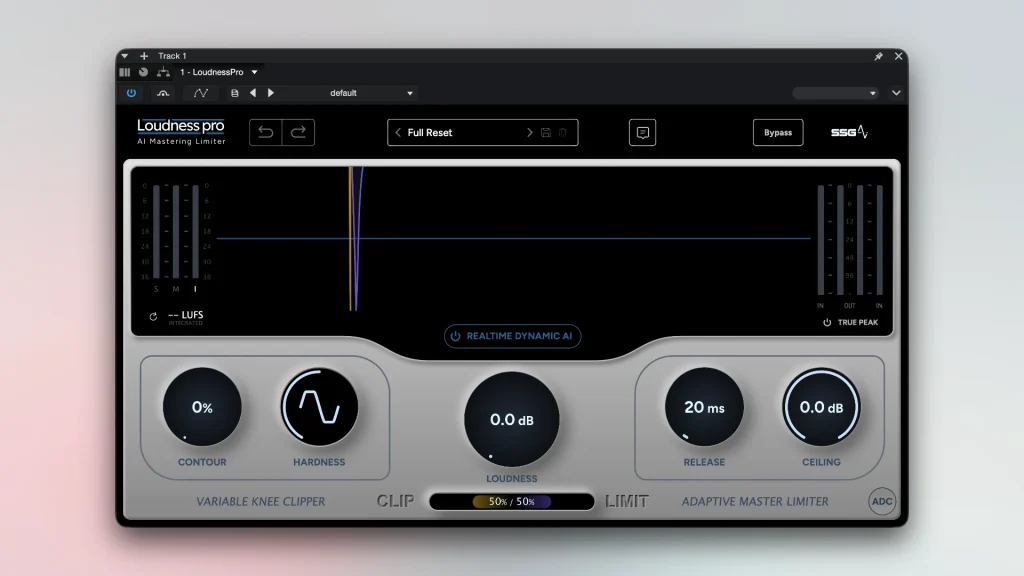
SSG Audio Loudness Pro

A cutting-edge intelligent mastering maximiser and limiter, SSG Audio Loudness PRO is intended to elevate the quest for transparent loudness. Digital signal processing (DSP) methods in this field have advanced fairly slowly over the past few decades, yielding only modest gains. By combining the unwavering quality of a clipper and limiter.

The main technological idea behind the plugin is to do away with the constant trade-off between limiting and clipping. Sharp transients are flawlessly handled by a conventional clipper, but sustained notes are immediately distorted, imparting an unpleasant digital crunch.

Conversely, a limiter ruthlessly “chomps” on drums while processing sustain gently, depriving the mix of weight and power. Using built-in AI, Loudness PRO rapidly modifies the ratio between these two processing types thousands of times per second, analysing the audio input in real time at a speed that is entirely impossible to achieve through manual automation. This eliminates the need for cloud services or generative algorithms and enables you to create an unprecedentedly loud, crisp, and punchy master file locally on your computer.

Key Features:

  • Real-time sample management with intelligence. With sample-by-sample accuracy, built-in AI completely regulates the clipper/limiter chain’s architecture, balance, and settings, adjusting processing to each track moment.
  •  The highest volume possible without loss. With the plugin, you can maintain the inherent dynamics of instruments and the crisp attack of drums while achieving a rich, competitive commercial volume level.
  •  Complete transparency of sound. The device avoids audible distortion during sustain and releases the final mix from the effects of “pumping” and constriction because of dynamic algorithm switching.
  •  Local processing that is independent. Neural networks are not trained using your audio files, and the plugin operates in real time right within your DAW without the need for initial offline analysis.
  • An interface that is simple and effective. By eliminating the need to spend hours implementing intricate automation, the tool enables you to obtain clean, predictable outcomes in a matter of seconds in both completely manual and automatic modes.

Frequently asked questions

How to install and activate?

Installation and activation instructions are included in the package (inside).

Is the program corrupted? Is the file broken? Or is there other errors?

There are so many errors, we can't list them all here. Therefore, we've described all the solutions (with pictures) in the article: Errors when installing applications on a Mac

How do I update? Officially? What happens with activation?

Official updates may result in loss of activation unless otherwise stated in the installation instructions.
To update the software from this website, you must download the new version of the software from here (if available) and install it over the version currently installed on your computer. This will preserve your activation and settings for the software.

How do I download it? The link isn't working? What is .torrent?

To download large files, it is recommended to use any download manager, for example, FDM (Free Download Manager)
For downloading from a file sharing service like Filen.io, it's not recommended to use Safari. Use Google Chrome or the aforementioned FDM browser, for example.
To download files via torrent (.torrent file), you need a torrent client, such as Transmission or the aforementioned FDM.
Please remember that providers may block access to some websites (1fichier.com, etc.). To bypass these blocks, it is recommended to use a VPN.

An update has been released. When will you update the version?

The site administration doesn't hack anything. That's the job of release teams and some enthusiasts. They're the ones responsible for ensuring updates are available. But you can hack software yourself by learning reverse engineering.

Add... Where is the order desk?

Definitely not in the comments. The site administration doesn't hack anything, and there's no order desk. However, you can order the software you need (not for free) in a special thread on forum.ru-board.com.

How to change the language?

Open System Preferences -> General > Language & Region -> Applications – "+".
Select an app and language. This method works for most apps.
The language in Adobe products is usually selected during the installation of the product itself.
The language in games is usually changed in the game settings itself.
There are exceptions. Don't hesitate to search for information online.

How to delete?

There are many options. The easiest is to use specialised app removal tools, such as App Cleaner & Uninstaller.
To remove Adobe products, use the Creative Cloud Cleaner Tool.

Need help?

The site offers a paid service: remote assistance (via AnyDesk, Zoom, or Skype) with the installation of any applications (not just those from this site) on any Mac or PC.

specs.txt
version1.0.75
developerSSG Audio
activationK'ed by MORiA
compatibilitymacOS 10.13 and later
size55MB
architectureARM , x86 (64-bit)
languagesEnglish

Installation notes

Installation and activation instructions are included in the package (inside).

Download — Direct download link

55MB · v1.0.75

More mirrors (2)

Always scan downloaded files before opening them. This listing is provided for informational purposes; verify compatibility with your system before installing.

Leave a comment

Your email address will not be published. Required fields are marked *