macOS Editor's Pick Extensions

Wave Alchemy Glow 1.2.1

17 views
Wave Alchemy Glow

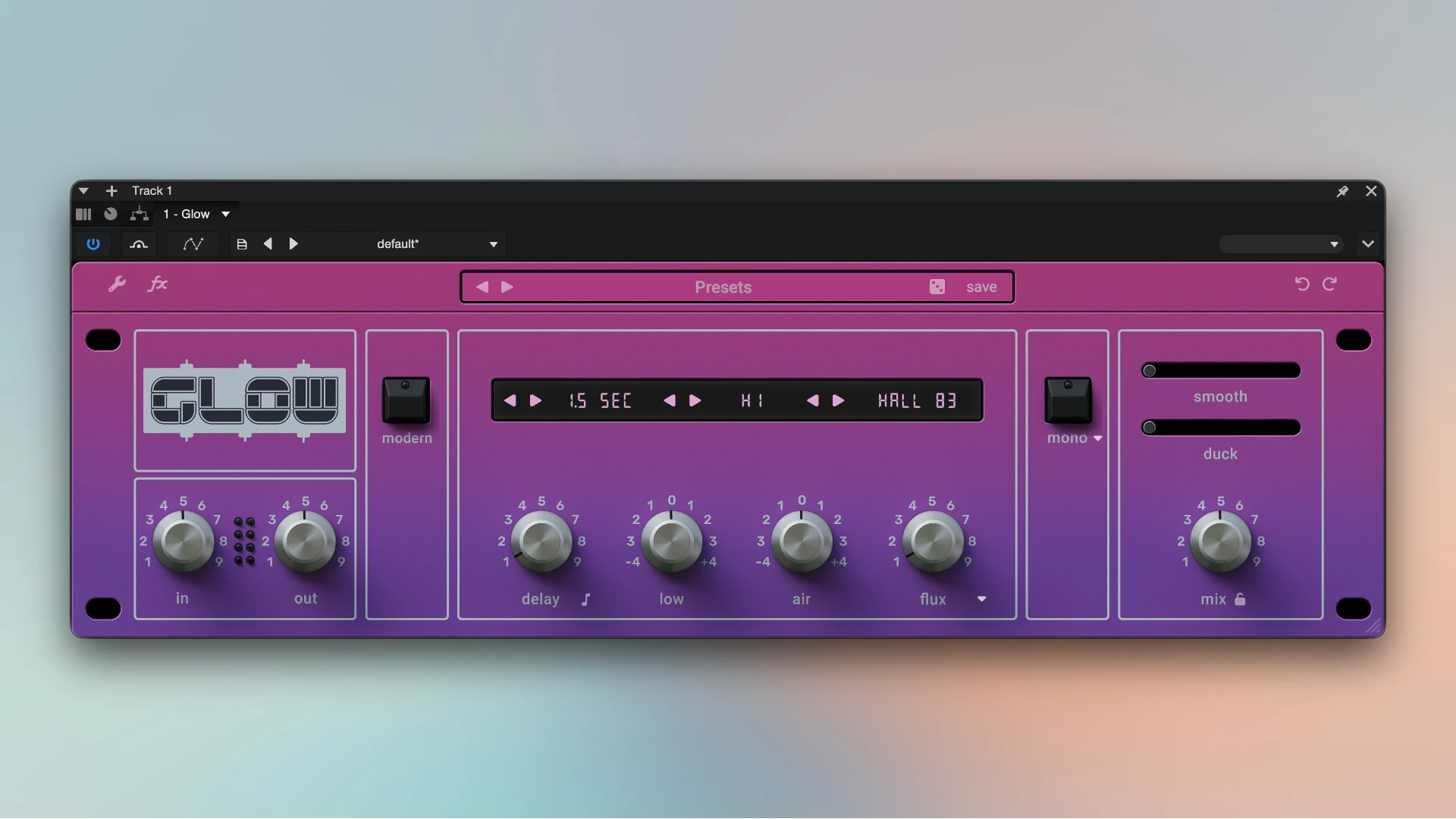
Wave Alchemy Glow is a potent hybrid reverb plugin that adds sophisticated DSP capabilities like dynamic ducking, transient smoothing, and multi-band modulation while accurately simulating the storied AMS RMX16 hardware from the 1980s. Lush ambient synth tones and traditional, powerful gated snares are flawlessly captured.

By incorporating the special algorithms of the original gear into your music software, this plugin accurately recreates the distinctive digital look of the early audio effects era. It adds that recognisable retro vibe and sophisticated gloss, quickly turning flat tracks into expansive audio canvases.

That iconic gated reverb:

This plugin instantly produces the well-known deep, sudden, expansive effect on the kick drum and snare that came to define pop and rock music in the 1980s. The device helps swiftly expand the sound into a broad and cinematic stereo image by producing deep, breathy, and infinitely stretching synth loops.

Vintage Digital Character:

By meticulously preserving the unique structure and warmth of early digital converters, special modelling techniques give the mix’s vocalists and instruments a pleasing texture and weight. Establish the ideal mood quickly.

You may discover the ideal volume for any part of the song in a matter of seconds thanks to a well-considered collection of traditional spatial modes, which do away with tedious and repetitive parameter adjustments

Key Features:

  • 14 Classic Algorithms: Contains classic reverb kinds that are heavily modelled, such as Halls, Plates, Ambience, and the highly sought-after NonLin 2 program for famous gated room effects.
  • Hybrid Engine: Adds dynamic modulation and transient manipulation by combining a bespoke DSP with convolution for the core acoustic space.
  • Creative Sound Shaping: Features a ducking control that automatically reduces the reverb intensity when a dry input is present, a smooth slider to reduce sharp transients in the reverb tail, and a flux parameter for rich stereo and pitch modulation.
  • Character Modes & EQ: Character Modes (Clean, Vintage, and Gritty), which replicate the old SP-1200 lo-fi circuitry, allow you to precisely colour the reverb tail, while the modern mode tightens the low end and stereo image.
Frequently asked questions

How to install and activate?

Installation and activation instructions are included in the package (inside).

Is the program corrupted? Is the file broken? Or is there other errors?

There are so many errors, we can't list them all here. Therefore, we've described all the solutions (with pictures) in the article: Errors when installing applications on a Mac

How do I update? Officially? What happens with activation?

Official updates may result in loss of activation unless otherwise stated in the installation instructions.
To update the software from this website, you must download the new version of the software from here (if available) and install it over the version currently installed on your computer. This will preserve your activation and settings for the software.

How do I download it? The link isn't working? What is .torrent?

To download large files, it is recommended to use any download manager, for example, FDM (Free Download Manager)
For downloading from a file sharing service like Filen.io, it's not recommended to use Safari. Use Google Chrome or the aforementioned FDM browser, for example.
To download files via torrent (.torrent file), you need a torrent client, such as Transmission or the aforementioned FDM.
Please remember that providers may block access to some websites (1fichier.com, etc.). To bypass these blocks, it is recommended to use a VPN.

An update has been released. When will you update the version?

The site administration doesn't hack anything. That's the job of release teams and some enthusiasts. They're the ones responsible for ensuring updates are available. But you can hack software yourself by learning reverse engineering.

Add... Where is the order desk?

Definitely not in the comments. The site administration doesn't hack anything, and there's no order desk. However, you can order the software you need (not for free) in a special thread on forum.ru-board.com.

How to change the language?

Open System Preferences -> General > Language & Region -> Applications – "+".
Select an app and language. This method works for most apps.
The language in Adobe products is usually selected during the installation of the product itself.
The language in games is usually changed in the game settings itself.
There are exceptions. Don't hesitate to search for information online.

How to delete?

There are many options. The easiest is to use specialised app removal utilities, such as App Cleaner & Uninstaller.
To remove Adobe products, use the Creative Cloud Cleaner Tool.

Need help?

The site offers a paid service: remote assistance (via AnyDesk, Zoom, or Skype) with the installation of any applications (not just those from this site) on any Mac or PC.

specs.txt
version1.2.1
developerWave Alchemy
activationk'ed by GUISEPPE
compatibilitymacOS 10.12 and later
size397MB
architectureARM , x86 (64-bit)
languagesEnglish

Installation notes

Installation and activation instructions are included in the package (inside).

Download — Direct download link

397MB · v1.2.1

More mirrors (2)

Always scan downloaded files before opening them. This listing is provided for informational purposes; verify compatibility with your system before installing.

Leave a comment

Your email address will not be published. Required fields are marked *