macOS NewEditor's Pick VST Extensions

Bogren Digital Ampknob Duet 1.0.213 1.0.213

22 views
Bogren Digital Ampknob Duet

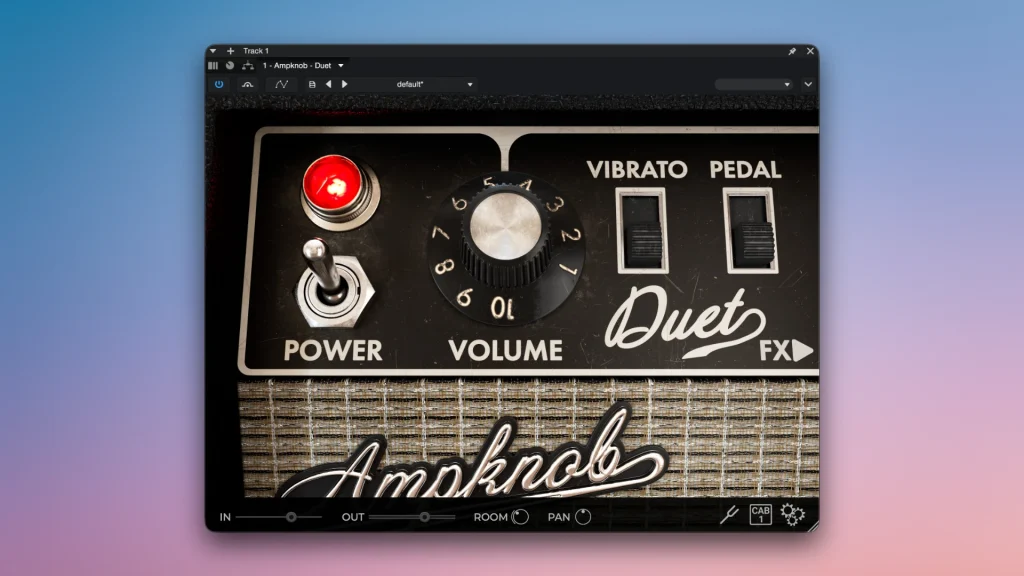
The iconic 1960s compression combo amp that helped create the distinctive sound of jazz, blues, surf rock, classic country, and 70s funk is the model for the Bogren Digital Ampknob Duet, a virtual guitar amplifier.

With a tone that may be characterised as rich, crystal clear, huge, and extremely refined, this plugin has earned its title as the king of clean sound. The amplifier has enormous headroom and is incredibly resistant to distortion. To create the trademark barely perceptible analogue breakup, it must be pushed to its limits.

The exceptional honesty and dynamics of the Ampknob DUET are its distinctive characteristics. It sounds just like your guitar, showcasing its genuine nature in sharp detail. The plugin is the ideal pedal platform, true to its legendary hardware prototype: you can attach any virtual fuzzes, distortions, boosters, or compressors in front of it with confidence, and the simulated tube stage will fully bring out their character.

Key Features

  • The idea of a single knob. You can quickly create a reference, mix-ready guitar tone with the iconic Ampknob series interface, saving you the trouble of adjusting dozens of knobs and looking for balance.
  •  Crystal loudness and clarity. The amplifier adds noble volume, depth, and distinctive brilliance to the sound, producing a wide, deep, and transparent sound from every note.
  •  The pedal platform is perfect. The plugin reacts sensitively to input heat.
  • The superior cabinet part. Professional engineers have tuned the integrated speaker and microphone simulation unit, enabling the guitar to instantly adopt the proper and readable position in your arrangement.
  • Dynamics and tactile responsiveness. The musician feels as though they are performing through a real live stack in the studio since the mathematical model faithfully mimics the behaviour of actual tubes and transformers.

Frequently asked questions

How to install and activate?

Installation and activation instructions are included in the package (inside).

Is the program corrupted? Is the file broken? Or is there other errors?

There are so many errors, we can't list them all here. Therefore, we've described all the solutions (with pictures) in the article: Errors when installing applications on a Mac

How do I update? Officially? What happens with activation?

Official updates may result in loss of activation unless otherwise stated in the installation instructions.
To update the software from this website, you must download the new version of the software from here (if available) and install it over the version currently installed on your computer. This will preserve your activation and settings for the software.

How do I download it? The link isn't working? What is .torrent?

To download large files, it is recommended to use any download manager, for example, FDM (Free Download Manager)
For downloading from a file sharing service like Filen.io, it's not recommended to use Safari. Use Google Chrome or the aforementioned FDM browser, for example.
To download files via torrent (.torrent file), you need a torrent client, such as Transmission or the aforementioned FDM.
Please remember that providers may block access to some websites (1fichier.com, etc.). To bypass these blocks, it is recommended to use a VPN.

An update has been released. When will you update the version?

The site administration doesn't hack anything. That's the job of release teams and some enthusiasts. They're the ones responsible for ensuring updates are available. But you can hack software yourself by learning reverse engineering.

Add... Where is the order desk?

Definitely not in the comments. The site administration doesn't hack anything, and there's no order desk. However, you can order the software you need (not for free) in a special thread on forum.ru-board.com.

How to change the language?

Open System Preferences > General > Language & Region -> Applications – "+".
Select an app and language. This method works for most apps.
The language in Adobe products is usually selected during the installation of the product itself.
The language in games is usually changed in the game settings itself.
There are exceptions. Don't hesitate to search for information online.

How to delete?

There are many options. The easiest is to use specialised app removal tools, such as App Cleaner & Uninstaller.
To remove Adobe products, use the Creative Cloud Cleaner Tool.

Need help?

The site offers a paid service: remote assistance (via AnyDesk, Zoom, or Skype) with the installation of any applications (not just those from this site) on any Mac or PC.

specs.txt
version1.0.213
developerBogren Digital
activationK'ed by MORiA
compatibilitymacOS 10.13 and later
size382MB
architectureARM , x86 (64-bit)
languagesEnglish

Installation notes

Installation and activation instructions are included in the package (inside).

Download — Direct download link

382MB · v1.0.213

More mirrors (2)

Always scan downloaded files before opening them. This listing is provided for informational purposes; verify compatibility with your system before installing.

Leave a comment

Your email address will not be published. Required fields are marked *